




 Get to WhatsApp

Our manager will contact you
within 15 minutesт
Bing Tests a New “Open” Button to Expand Website Sitelinks Directly in Search Results
Microsoft Is Quietly Rethinking How Users Navigate From Search
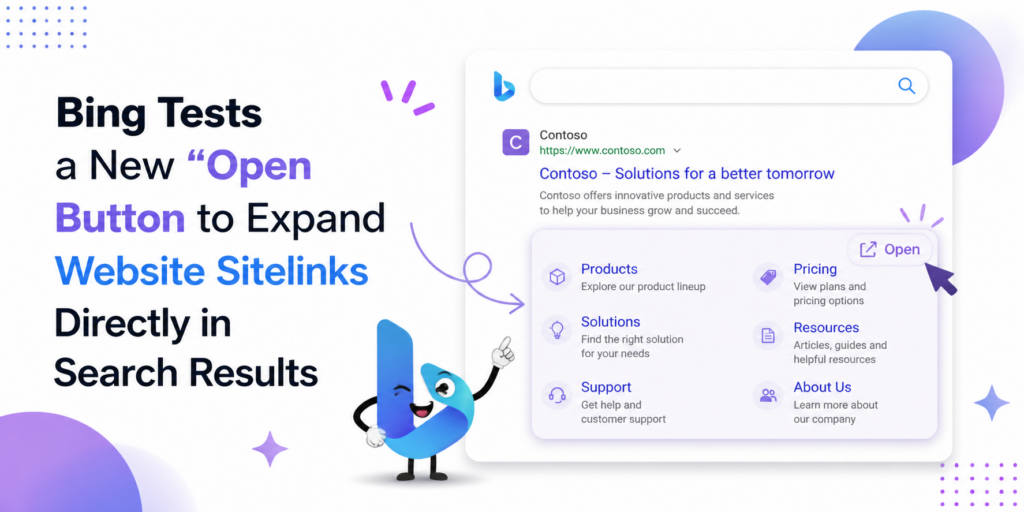
Bing Tests a New “Open” Button to Expand Website Sitelinks Directly in Search Results
Microsoft’s search engine has been spotted testing a new interface element that changes how sitelinks — the secondary navigation links displayed beneath a main search result — are presented and accessed. Instead of showing these links directly below the result snippet in the traditional format, the experimental version displays a button labeled with the site’s domain name. When clicked, a panel with the site’s internal links opens on the right side of the screen, giving the user a structured preview of the website’s main sections without navigating away from the search results page.
The feature was first observed and shared publicly by SEO specialist Khushal Bherwani, who posted a screenshot showing the experimental layout alongside the standard sitelink format that most users are familiar with. The contrast between the two versions is notable: the traditional format places sitelinks as a compact row beneath the main snippet, visible immediately and requiring no additional click. The new format requires one interaction to reveal the same information — but delivers it in a larger, more navigable side panel rather than a compressed inline row.
What This Actually Changes for the User
At first glance, this seems like a minor interface refinement. In practice, it represents a meaningful shift in the interaction model between a user and a search result. The current sitelink format is passive — you see the links, you choose whether to click one. The new format is active — you first decide whether to explore the site at all by opening the panel, then make a navigation choice within it. This additional step could either increase deliberate engagement by users who are genuinely interested in exploring a specific site, or introduce friction for users who want immediate access to a specific page without an extra click.
The side panel approach also suggests Microsoft is thinking about search results as a space for richer pre-click exploration rather than a simple list of destinations. This direction is consistent with other interface experiments Bing has been running — including AI-generated summaries positioned alongside results and expanded preview functionality that surfaces content from a page before a user commits to visiting it. The “Open” button for sitelinks fits into a broader pattern of making the search results page itself a more complete information environment.
What It Means for Website Owners and SEO
For businesses and website owners, the practical implication is worth monitoring carefully. Sitelinks are not manually chosen by site owners — they’re algorithmically determined based on site structure, internal linking, and how clearly each section of a site signals its purpose to search engine crawlers. If this interface becomes standard, the quality and clarity of a site’s internal architecture becomes even more consequential: the links that appear in the panel are the ones that represent the site to users at the moment of first consideration, before any click has been made.
A site with well-structured navigation, clearly labeled sections, and strong internal linking is more likely to have its most commercially relevant pages surfaced in a panel like this. A site with poor architecture, duplicate page titles, or unclear section hierarchy may have less useful links appear — or fewer links overall. The incentive to maintain clean site structure has always existed for organic search performance; this experimental feature adds a new layer to that incentive by putting the site’s navigational skeleton directly in front of users at the decision point.
It is also worth noting that this type of feature directly affects click-through behavior in ways that are difficult to predict without live data. If users explore more pages through the panel without clicking through to the main domain, it could reduce direct traffic to certain pages while increasing exposure to others. How Bing measures and attributes these interactions — and whether they influence how a site is ranked or presented in subsequent searches — remains to be seen. The feature is still in testing and has not been rolled out broadly, which means the full behavioral and SEO implications are still an open question.
A Pattern Worth Paying Attention To
Microsoft has been running a notably high volume of search interface experiments over the past eighteen months. Some have made it into production; many have not. This particular test stands out because it touches one of the most fundamental elements of how organic search results are structured — the relationship between a main listing and its navigational sub-links. That’s not a cosmetic change but a structural one, and structural changes to how search results are presented have historically had measurable effects on click behavior across the industry.
Whether the “Open” button becomes a permanent feature or disappears quietly after testing depends on what the engagement data shows. If users interact with the panel at meaningful rates and the interactions correlate with positive outcomes — longer sessions, more relevant page visits, lower immediate return-to-search behavior — there’s a reasonable case for keeping it. If the extra click creates friction that reduces overall engagement with results, the experiment will likely be retired. Either outcome will produce data that shapes how Bing approaches sitelink presentation going forward.