




 Get to WhatsApp

Our manager will contact you
within 15 minutesт
Why Your Website Ranking Dropped: 7 Real Causes and How to Recover Fast
7 causes, one recovery plan

Why Your Website Ranking Dropped: 7 Real Causes and How to Recover Fast
Hello, my respected reader. The topic of positions rising and suddenly collapsing is one of the most stressful situations any site owner can face, and it is more common than you might think. I have personally worked through dozens of cases where a well-performing project lost visibility almost overnight — and in every single case, there was a specific, diagnosable reason behind it. As a specialist who has pulled sites out from under search engine filters more than once, and who carries significant experience in both the technical side of projects and link profile analysis, I can tell you with confidence: nothing drops without a cause. In this article I will walk you through the main reasons why your website ranking dropped, explain what to do when it happens, and show you how to recover positions without making the situation worse. You can also order a comprehensive site audit from my agency, after which I will identify the exact reasons your positions declined and lay out a recovery path.
How to tell a temporary fluctuation from a real drop — and what to do first
⚡ Quick Answer
Ranking drops happen for seven primary reasons: technical errors that block crawling or indexation, competitor link attacks using low-quality sources, content stagnation, duplicate content issues, domain age dynamics, internal linking collapse, and misaligned content-to-intent matching. Each cause has a distinct fingerprint in your data — and each has a specific recovery sequence. The worst thing you can do is panic and make multiple simultaneous changes, because that makes it impossible to identify what actually worked.
What’s Inside This Guide
- — Cause 1: Technical errors that silently undermine your visibility.
- — Cause 2: Competitor link attacks and negative SEO.
- — Cause 3: Content stagnation and failure to update.
- — Cause 4: Duplicate content and cannibalization.
- — Cause 5: Domain age dynamics and the volatility that comes with them.
- — Cause 6: Internal linking collapse and orphaned pages.
- — Cause 7: Content-to-intent mismatch and topical drift.
- — Recovery checklist: what to do first and in what order.
Cause 1: Technical Errors That Silently Undermine Your Visibility
Technical problems are responsible for a larger share of sudden position losses than most site owners realize, precisely because they are invisible on the surface. The page looks fine to a human visitor. The content is there. The design is intact. But somewhere in the infrastructure, something has gone wrong that prevents search engines from properly crawling, rendering, or indexing the content — and positions drop as a result.
The most common technical culprits I encounter when auditing sites that have lost visibility are not exotic or complicated. They are ordinary errors that accumulate quietly over months of development activity: a robots.txt change that accidentally blocks entire sections of the site, a noindex tag applied during a staging migration that never got removed, a canonical pointing to the wrong URL, or a sitemap that references URLs returning 404 errors. These are simple things. But their impact on ranking is anything but simple.
The robots.txt trap:
One of the fastest ways to tank a site’s visibility is a single line in robots.txt. I have seen cases where a developer added a Disallow rule to block a temporary staging subdirectory and accidentally included the wrong path — effectively telling search engines not to crawl the entire site. Rankings dropped within two to three weeks of the next major crawl. The fix took five minutes. The recovery took four months.
Page speed and Core Web Vitals degradation also belong in this category. A website that loads slowly on mobile devices, blocks rendering with unoptimized JavaScript, or fails Cumulative Layout Shift thresholds is not just frustrating for users — it is sending signals that affect how search engines evaluate the quality of the experience. Positions on competitive queries are particularly sensitive to this because the top results are usually technically solid, and any degradation on your end shifts the balance.
Server-side issues are another underdiagnosed cause. Intermittent 500 errors, slow server response times during peak crawl periods, and misconfigured redirects — especially chains of three or more hops — all degrade how efficiently search engines can process your content. If the Googlebot encounters too many errors during a crawl cycle, it may reduce crawl frequency, which means fresh content and updates take longer to be indexed, and any improvements you make take longer to reflect in positions.
To audit your technical state properly, start with Google Search Console’s Coverage report and Page Experience section. Then run a full crawl with Screaming Frog or a similar tool and cross-reference the output with your server access logs to understand what is actually being crawled versus what you think is being crawled. The gap between those two things is usually where the problem lives. A thorough On-Page SEO checklist is a solid starting point for systematically ruling out the most common page-level issues before moving to deeper technical investigation.
Cause 2: Competitor Link Attacks and Negative SEO
This is a topic the industry does not discuss as openly as it should, probably because it is uncomfortable to acknowledge that someone can deliberately damage your site’s standing by pointing low-quality links at it. But it happens — more frequently in competitive niches where the financial stakes of ranking differences are high — and ignoring it as a possibility means missing a cause that, if left unaddressed, will keep undermining your position even after you fix everything else.
Negative SEO through link spam works by flooding your backlink profile with signals that search engines associate with manipulative or low-quality link acquisition: links from gambling or adult content sites in unrelated languages, links containing spammy anchor text with exact-match keywords or prohibited phrases, links from private blog networks that have already been penalized, and mass links from link farms that generate thousands of placements overnight. When this volume hits your profile suddenly, it can trigger an algorithmic response that causes positions to drop across a broad range of queries.
How to detect a link attack before it does serious damage:
Monitor your backlink profile at least once a month using Ahrefs, Semrush, or a similar tool. Set up alerts for sudden spikes in new referring domains. A legitimate organic link growth pattern looks like a gradual upward slope. A link attack looks like a vertical line — hundreds or thousands of new domains appearing within days, often from the same hosting ranges or with similar anchor text patterns. Catching this early gives you time to disavow before it affects your positions significantly.
The disavow tool in Google Search Console is the primary defense here, but it needs to be used carefully. Disavowing legitimate links — even accidentally — can remove authority you have legitimately earned. The process should involve building a qualified disavow file that contains only the domains or URLs you have confirmed are toxic, cross-referenced against your natural link profile to avoid any false positives. If you are not confident in making that distinction, working with someone who has handled disavow projects before is worth the investment.
It is also worth understanding that not every competitor attack comes through links. Scrapers that systematically copy your content and republish it faster than you can get indexed can cause duplicate content issues that push your original version down. Fake reviews posted to your Google Business Profile can damage your local visibility. Reporting competitor URLs to Google using false spam claims is another documented tactic. The common thread is deliberate, targeted interference — and recognizing the pattern is the first step toward countering it effectively.
Understanding the mechanics of link quality from both directions — building and defending — is essential. The complete guide on what is link building explains the fundamentals of how search engines evaluate link signals, which directly informs how you identify when those signals are being weaponized against you.
Cause 3: Content Stagnation and Failure to Update
There is a persistent misconception in the market that once a page ranks, it continues ranking indefinitely as long as nothing breaks. This used to be closer to true than it is today. Content that sits untouched for extended periods while the competitive landscape around it evolves, while user behavior shifts, and while the factual context changes is content that gradually loses its relevance signal — and positions follow.
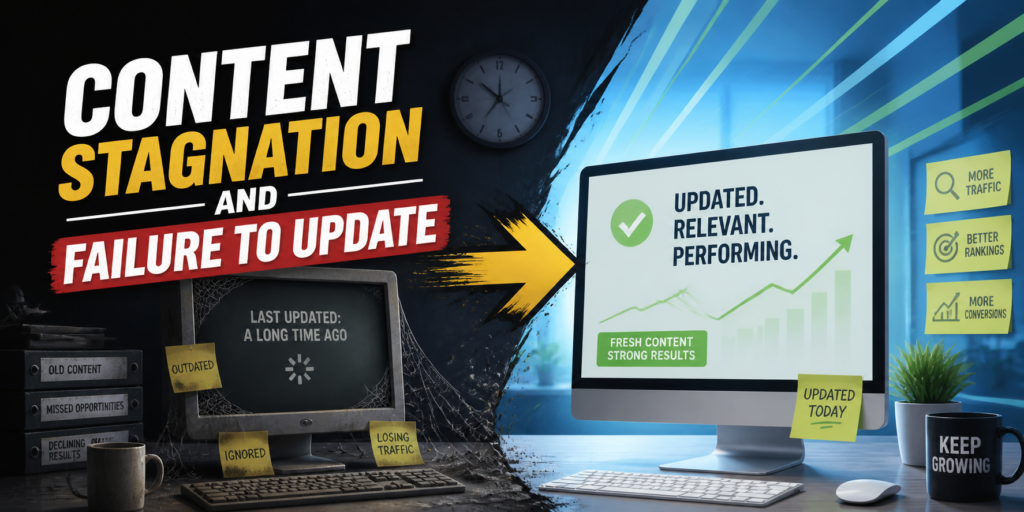
The mechanism is not mysterious. A website that published a comprehensive guide three years ago and has not touched it since is competing against pages that were written more recently, updated regularly, and structured to address the query in ways that match how users are currently phrasing it. Search engines pick up on freshness signals — not just the date of publication, but the frequency and substantiveness of updates, the addition of new information that was not available at the time of original publication, and the alignment of the content with current search intent patterns.
Content decay is slow and hard to spot until it accelerates:
Positions rarely collapse overnight from content staleness. They typically slide gradually — losing one or two spots every few months as fresher competitors inch past. The danger is that this slide often goes unnoticed until the page has moved from position three to position eleven, at which point traffic has dropped by seventy or eighty percent and the psychological impact prompts hasty decisions that make recovery harder.
Blog sections that were once regularly updated and then abandoned are a particularly clear example of how content stagnation translates into ranking losses. A blog that published consistently for two years and then went quiet sends a signal of reduced editorial activity. Internal pages that reference statistics, tools, or market conditions from several years ago lose credibility in the eyes of both users and automated quality evaluators. Even the structure of content matters — a page that was formatted for desktop consumption in a period before mobile-first indexing became dominant may be technically complete but structurally outdated in ways that affect how it performs.
The recovery approach here is methodical. Identify which pages have lost the most positions over the past six to twelve months. Look at the current top-ranking pages for those queries and map the gaps — what are they covering that you are not? What structural elements do they use? How do they address the query at different levels of depth? Then update accordingly, not just by adding paragraphs but by genuinely improving the match between the content and what users at that query stage actually need.
Cause 4: Duplicate Content and Cannibalization
Duplicate content is one of those issues that site owners frequently underestimate because it does not feel like a serious problem until positions have already dropped. The logic seems reasonable: if the content is good, why does it matter if it appears in multiple places? The answer is that search engines need to make decisions about which version of a page to rank, and when multiple versions compete — whether across domains or within the same site — the signal gets diluted and positions suffer.

Internal duplication is more common than external. It occurs when a website generates multiple URLs that serve substantially similar or identical content: category and tag archive pages with overlapping post listings, product pages with variants that each get their own URL, print-friendly page versions, session ID parameters appended to URLs, HTTP and HTTPS versions both accessible without a proper redirect, and www versus non-www versions both resolving without canonicalization. Each of these is a scenario where the same content is competing against itself for the same query.
Keyword cannibalization is a subtler but equally damaging variant:
When two pages on the same site target the same primary keyword with similar content, they split the authority and click signals between them. Neither page accumulates the strength it needs to rank well. This often happens organically over time as a site publishes more content — a blog post about “email marketing tips” and a service page about “email marketing services” both competing for “email marketing” related queries, each preventing the other from ranking as strongly as it otherwise would.
The canonical tag is the primary technical solution for internal duplication, but it needs to be implemented correctly to work. A canonical that points to itself, or that is applied inconsistently across paginated versions, or that conflicts with the hreflang configuration on international sites, adds complexity without solving the underlying problem. The fix requires a clear mapping of which URL is the definitive version for each piece of content, followed by consistent implementation across all affected pages.
For cannibalization, the solution is more strategic than technical. It involves deciding which page should own which query, then either merging the competing pages into one stronger piece, differentiating them sufficiently that they target genuinely distinct intent, or consolidating the weaker page into the stronger one with a redirect. This kind of content architecture work is often the highest-leverage activity available when a site has been publishing for several years without a deliberate structure governing which page is responsible for which topic.
Cause 5: Domain Age Dynamics and the Volatility That Comes With Them
The relationship between domain age and ranking stability is more nuanced than most discussions acknowledge. Conventional wisdom says older domains rank better, and there is truth to that — an established domain with years of consistent content publication, a clean link profile, and accumulated trust signals is generally more stable than a brand-new site trying to compete in the same space. But age alone is not a shield, and in some specific patterns, it can actually be a source of unexpected volatility.
New websites go through what practitioners informally call a trust-building period — a phase during which positions are unstable, sometimes artificially inflated, and then corrected. A site that launches with a solid technical foundation and quality content may initially rank well for moderately competitive queries because the content is fresh and the signals are clean. Then, as the search engine accumulates more data about user behavior on those pages — bounce rates, time on page, return clicks — it adjusts positions to reflect the actual quality of the experience. This correction can look like a sudden drop even though it is actually a recalibration.
The opposite pattern: older sites becoming vulnerable:
Established websites can lose stability when they stop evolving at the pace their competitive environment demands. A site that ranked comfortably for years on the strength of its age and accumulated authority but never updated its content architecture to reflect how queries have evolved, never improved its mobile experience, and never acquired new links is essentially an old building with outdated infrastructure. Age bought time. But competitors who invested consistently during that period eventually accumulate comparable authority with better technical foundations.
There is also the expired domain phenomenon. Sites built on purchased expired domains sometimes rank quickly initially because the domain carries residual authority from its previous life. Then Google identifies the disconnect between the historical link profile and the current content, recalibrates the authority assessment, and positions dropped across the board. If your site was built on an expired domain, this is worth investigating as a background factor.
For newer sites navigating this volatile phase, the most important thing to understand is that the instability is normal and does not mean the strategy is wrong. Consistent, high-quality work during this period compounds into lasting stability. Panicking and making structural changes in response to normal fluctuation is one of the most common ways site owners extend their instability rather than shortening it. The guide on how long does SEO take to show results gives a realistic, benchmarked perspective on what timelines actually look like at different stages of a site’s development.
Cause 6: Internal Linking Collapse and Orphaned Pages
Internal linking is one of the least glamorous topics in search optimization, which is exactly why it is so frequently neglected — and why its deterioration causes drops that are genuinely puzzling to diagnose without knowing where to look. The internal link structure of a website is the primary mechanism through which authority flows from high-value pages to the rest of the site. When that structure breaks down, pages that should be ranking well lose the equity that was supporting them.
Internal linking collapse happens in several ways. The most common is a site redesign or navigation overhaul that removes or reroutes the links that were previously passing authority to key pages. A page that was linked from the homepage, the main navigation, and several high-traffic blog posts may suddenly become reachable only through the sitemap after a redesign — and its positions drop accordingly because the authority signals that were flowing to it have been cut.
Orphaned pages — pages that are indexed but receive no internal links from anywhere on the site — are a related problem. These pages may have once been well-connected but became isolated as the site grew and the internal architecture was not maintained. From a crawl perspective, they exist in a kind of dead zone: search engines may find them through the sitemap or external links, but without internal signals pointing to them, they receive minimal authority and often minimal crawl frequency.
A practical diagnostic for internal linking problems:
Run a crawl with Screaming Frog and filter for pages with zero internal inlinks. Cross-reference that list with your Search Console performance data — any page that was previously receiving organic traffic but now appears in the orphaned list has almost certainly lost positions as a direct result of the linking change. These are easy wins: adding two or three contextually relevant internal links to those pages from high-traffic content can produce measurable ranking improvements within a single crawl cycle.
Anchor text diversity in internal linking also matters more than most site owners appreciate. A site that links to its target pages consistently with the same exact-match anchor text risks triggering the same over-optimization signals that external link spam does. Internal links should reflect natural editorial language — varied anchors that describe the destination page in context, not repeated keyword phrases inserted to influence rankings. The local context shapes this: for a local business, internal linking that connects location pages, service pages, and informational content in a coherent topical structure is one of the most powerful and underutilized tools available. The local SEO guide covers how this structure applies specifically to location-based visibility.
Cause 7: Content-to-Intent Mismatch and Topical Drift
This is the cause that I find most interesting from a strategic standpoint, and also the one that is most commonly invisible to site owners because it requires understanding not just what your content says but what users who type a specific query are actually trying to accomplish. Search engines have become increasingly sophisticated at modeling user intent — and when the intent behind a query shifts over time while your content stays fixed in its original framing, positions drop even if the content is technically excellent.
Intent mismatch takes several forms. The most straightforward is format mismatch: a query that the algorithm has determined users want answered in a listicle format is being served by your site with a long narrative essay. Or a query where users clearly want a comparison table is being answered with a prose review. The content may be accurate and comprehensive, but if it does not match the format expectation the algorithm has inferred from user behavior, it will underperform against competitors who have better format alignment.
Topical drift is a slower and more structural version of intent mismatch:
A website that was originally focused on a specific niche and then expanded into adjacent topics without maintaining clear topical authority signals can find its original ranking base eroding. Search engines evaluate topical expertise at the domain level as well as the page level. A site that clearly owns a specific subject area ranks more reliably for queries in that area than a generalist site with a few pages on the same topic. When you expand too broadly without deepening your core, the core weakens.
The recovery for intent mismatch starts with studying the current SERP for every query where you have dropped. Look at what format the top results use. Look at what questions they answer in their subheadings. Look at what elements they include that your page does not — tables, comparison sections, FAQs, process steps, specific data points. Then revise your page to close those gaps, not by copying but by genuinely improving your coverage of the topic in a format that matches what users at that query stage need.
For topical drift, the solution is more architectural. It involves identifying the core subject matter your site should own, auditing which of your existing pages contribute to that topical depth and which dilute it, and making deliberate decisions about content priorities going forward. In some cases this means deprioritizing or consolidating content in areas where you have spread too thin. In others it means significantly deepening coverage in your core area to re-establish authority signals. The resource on 7 steps to show up in AI search is particularly relevant here, because AI-powered search surfaces are especially sensitive to topical authority — they tend to cite sources that have demonstrated deep, consistent coverage of a subject rather than broad generalist sites.
Tools to Detect a Ranking Drop Before It Becomes a Crisis
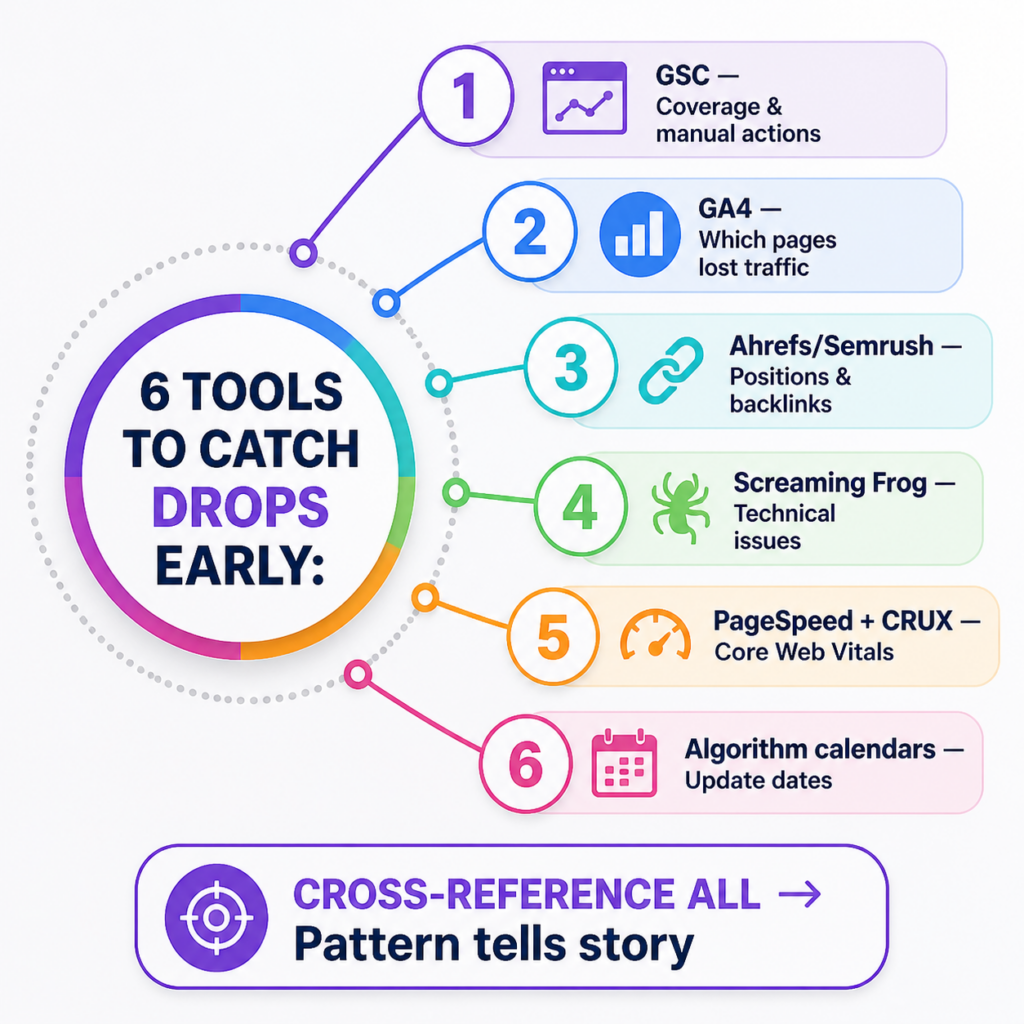
Knowing why positions drop is only useful if you find out early enough to act. The difference between a manageable setback and a serious recovery project is often simply how quickly the drop was identified. Here are the primary instruments worth having in place:
- ➤Google Search Console: the first place to check — Coverage errors, manual actions, Performance drops in impressions and clicks are all visible here and often give you the earliest signal
- ➤Google Analytics (GA4): segment organic traffic by landing page to identify which specific pages have lost visitors — this narrows the investigation considerably
- ➤Ahrefs or Semrush: position tracking for your target keywords, backlink monitoring for sudden profile changes, and organic traffic estimates that let you verify your own analytics data against third-party estimates
- ➤Screaming Frog: full site crawl that surfaces technical issues — broken links, redirect chains, missing canonicals, noindex tags on live pages, and duplicate content patterns
- ➤PageSpeed Insights and CrUX data: Core Web Vitals assessment that shows how your pages perform for real users, not just in lab conditions
- ➤Algorithm update calendars (Semrush Sensor, MozCast): cross-referencing the date of your drop against confirmed algorithm update dates tells you immediately whether the cause is algorithmic or site-specific
Cross-referencing all of these sources simultaneously is what separates a proper diagnostic from guesswork. A drop that coincides with an algorithm update and affects primarily content pages points toward a content quality or intent issue. A drop that coincides with a site update and affects the entire domain points toward a technical cause. A drop with no site changes and no algorithm update, concentrated in specific pages, points toward competitor activity or a link profile issue. The pattern tells the story — but only if you have the data to read it.
Recovery Checklist: What to Do First and in What Order
Main Causes of Ranking Loss: Diagnostic Reference
| Cause | Primary Symptom | First Diagnostic Step |
|---|---|---|
| Technical crawl blockage | Sudden sitewide drop, coverage errors in Search Console | Check robots.txt and noindex tags immediately |
| Competitor link attack | Spike in toxic referring domains, anchor text anomalies | Audit backlink profile for sudden volume spikes |
| Content stagnation | Gradual slide over months, concentrated on older pages | Identify pages with declining impressions in GSC Performance |
| Duplicate content | Pages underperforming despite strong content quality | Run crawl and check for duplicate URL patterns or canonical errors |
| Domain age instability | Volatile positions on new or recently relaunched domains | Check domain history and previous ownership in Wayback Machine |
| Internal linking breakdown | Drop concentrated on specific pages after a site redesign | Map internal links to affected pages before and after the change |
| Intent mismatch | Rankings dropping despite high content quality and strong links | Compare page format against current top-ranking competitors |
| Core Web Vitals failure | Drop correlating with Page Experience update, mobile underperformance | Run PageSpeed Insights and review CrUX field data in GSC |
| Manual action (penalty) | Sudden severe drop, manual action notification in GSC | Check Manual Actions section in Search Console immediately |
| Keyword cannibalization | Inconsistent rankings, multiple pages appearing for same query | Export GSC queries and identify pages competing for identical terms |
Priority Recovery Checklist With Timelines
| Recovery Action | Priority Level | Expected Timeline to Impact |
|---|---|---|
| Check and fix robots.txt and noindex errors | Immediate — Day 1 | 2–4 weeks after next crawl |
| Verify manual actions in Search Console | Immediate — Day 1 | 30–60 days after reconsideration request |
| Audit and fix redirect chains and 404 errors | High — Week 1 | 3–5 weeks |
| Build disavow file for toxic backlinks | High — Week 1–2 | 6–12 weeks for algorithmic response |
| Fix canonical errors and duplicate URL patterns | High — Week 1–2 | 4–8 weeks |
| Restore broken internal links to key pages | High — Week 2 | 3–6 weeks |
| Update and deepen top-priority content pages | Medium — Week 2–3 | 6–10 weeks |
| Realign page format to current search intent | Medium — Week 2–3 | 4–8 weeks |
| Resolve Core Web Vitals failures | Medium — Week 3 | 4–10 weeks after fix deployment |
| Consolidate cannibalized pages | Medium — Week 3–4 | 6–12 weeks |
| Resume organic link acquisition | Ongoing — Month 2+ | 2–5 months for authority impact |
| Implement structured content architecture for topical depth | Strategic — Month 2+ | 3–6 months for compounding benefit |
Recovery is rarely linear, and it rarely happens as quickly as the drop did. A position that fell in two weeks after an algorithm update may take three to four months to fully recover — not because the fixes are ineffective but because search engines need time to re-crawl, re-evaluate, and re-rank based on the improved signals. The most important thing during a recovery period is to avoid compounding the problem with reactive changes. Fix what is broken systematically, document what you change and when, and give each fix enough time to be reflected in data before drawing conclusions.
If you want to understand the full strategic picture of building lasting visibility — not just recovering it — the guide on how to rank a website on top of Google covers the proactive side of the same equation.
One thing most recovery guides do not say:
The businesses that recover fastest from ranking drops are not the ones that react most aggressively. They are the ones that diagnose most accurately. Making ten changes simultaneously to address a suspected problem means you cannot identify which change actually worked — and if something goes wrong, you cannot isolate the cause. A disciplined, sequential approach to recovery is slower in the short term and faster in the long term. That is a trade-off worth accepting.
Understanding the full picture of building and recovering visibility is also directly tied to how well-structured your site is from the ground up. The principles in the On-Page SEO checklist serve double duty — they are as useful for preventing the issues described in this article as they are for recovering from them.
❓ Frequently Asked Questions
— Can a ranking drop happen without any changes on my end?
Yes, and it happens regularly. Algorithm updates, competitor improvements, and external link attacks can all affect your positions without any action on your part. This is why passive monitoring is not enough — active weekly checks of your position data and backlink profile are the only way to catch external-origin drops early.
— How do I know if my drop is algorithmic or a manual penalty?
Check the Manual Actions section in Google Search Console first. A manual penalty will have an explicit notification there. If that section is clear, the drop is algorithmic or site-specific. Cross-referencing your drop date against published algorithm update dates narrows it further.
Algorithmic drops are typically broader and affect multiple pages simultaneously. Manual penalties often target specific sections or the entire domain and tend to be more severe in magnitude.
— Is it possible to recover fully after a Google penalty?
Full recovery is achievable in the majority of cases, provided the root cause is correctly identified and addressed completely. Partial fixes that leave underlying issues in place result in partial recovery at best. The timeline varies significantly depending on the type and severity of the penalty and the quality of the remediation work.
— Why did only some of my pages drop while others stayed stable?
Page-specific drops usually indicate a content quality issue, an intent mismatch, or a technical error affecting specific page templates. If the dropped pages share a common template, category, or content type, that pattern points directly to the cause. Sitewide drops, by contrast, typically indicate a technical issue affecting crawling or a domain-level algorithmic assessment.
— Should I rebuild my entire website if rankings have been poor for a long time?
Almost never. A full rebuild introduces enormous technical risk — new URL structures, new internal linking patterns, potential indexation issues during migration — without addressing the strategic causes of poor performance. Fixing the existing site systematically is almost always the better path, except in cases where the technical debt is genuinely irreparable.
Before making any structural decision, run a comprehensive audit to understand exactly what is causing the problem. Rebuilding without that diagnosis just replicates the same issues in a new design.
— How long does a full ranking recovery typically take?
For technical fixes: two to six weeks. For content improvements: six to twelve weeks. For link profile remediation: two to four months. For full topical authority rebuilding: six to twelve months. These ranges assume competent, sequential execution — not concurrent chaos.
— Can publishing new content help recover lost positions?
New content helps with recovery when the drop was caused by topical gap or content staleness. It does not help with technical issues, link profile problems, or manual penalties — and publishing new content while those issues are unresolved can actually dilute your crawl budget and delay the fixes from being indexed and evaluated.
— What is the most common mistake site owners make during a ranking recovery?
Making too many simultaneous changes and then being unable to attribute what worked. The second most common mistake is stopping recovery efforts prematurely because positions have not moved within the first three to four weeks — before the fixes have had time to be crawled and evaluated.
— Does disavowing bad links always help?
When done correctly, yes. When done incorrectly — disavowing legitimate links alongside toxic ones — it can reduce your domain’s authority. The disavow file must be built carefully, with each entry verified as genuinely harmful before inclusion. Blanket disavows of large link volumes without individual review are risky.
— Can a competitor really tank my site by pointing spam links at it?
It is less effective than it once was, but it still happens and it still works in some circumstances — particularly against smaller sites that do not monitor their link profiles actively. Large, established domains with strong authority profiles are generally more resistant. Newer or smaller sites are more vulnerable to sudden link spam attacks.
— What is the single most valuable thing I can do right now if my positions dropped?
Open Google Search Console and look at three things in sequence: Manual Actions (for penalties), Coverage errors (for technical indexation issues), and the Performance report filtered by the last 28 days compared against the previous 28 days. Between those three, you will have enough information to form a credible hypothesis about the cause within thirty minutes.